System requirements
AdaOne has been known to run on a wide range of computer hardware. However, the minimum and recommended requirements are the following:
Windows
| Minimum | Recommended | |
|---|---|---|
| Operating system | Windows 10 or 11 (64-bit) | - |
| RAM | 16 GB | 32 GB or more |
| Processor | Intel or AMD 64-bit processor, 2 GHz or faster | - |
| Hard disk space | 4 GB | 10 GB |
| Graphics card | Dedicated GPU with OpenGL or Vulkan support and 4 GB of GPU memory. | NVIDIA RTX * series GPU with 8 GB of memory or more. |
| Internet | Internet connection is necessary to access our license server unless an offline license is used. | - |
| Monitor | 1920 x 1080 display or greater | - |
Due to common driver compatibility issues, most RTX PRO graphics cards are not recommended for use with AdaOne.
For reference, a list of typical problematic GPU models is available here: https://www.nvidia.com/fr-fr/products/workstations/quadro.
AdaOne runs reliably on configurations such as:
- CPU: 11th Gen Intel(R) Core(TM) i9-11900H @ 2.50 GHz
- GPU: NVIDIA GeForce RTX 3070 Laptop GPU
Example device: Alienware x15 R1.
Graphics Card Configuration
Configuring AdaOne to use the full potential of your graphics card will help with software performance as well as rendering performance. In Windows, go into System > Display > Graphics.
If AdaOne Executable is not showing up in your list of applications, then click the Add Desktop App button and navigate to AdaOne - Alpha Version.exe. Next, check the drop down for GPU Preference, the default setting could be 'Let Windows decide', change this to 'High Performance' option.
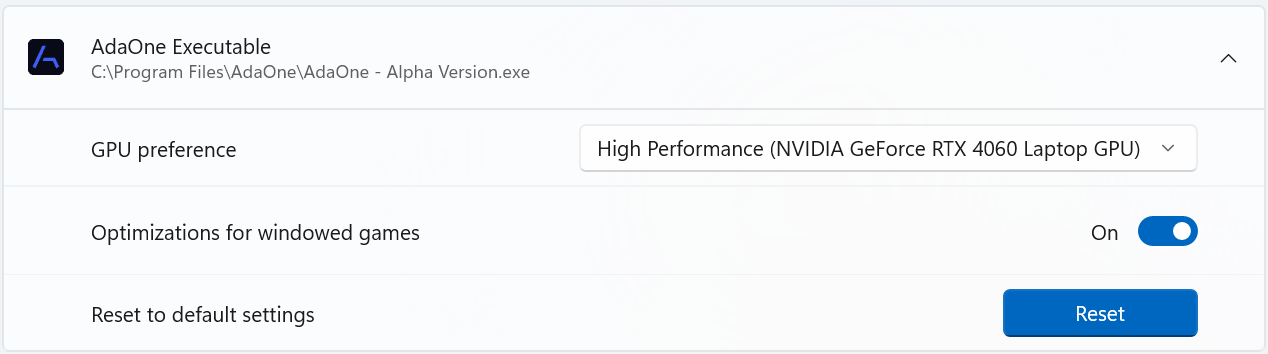
You have now configured AdaOne to use your graphics card in order to have the best performance with your setup.